
Pay quickly and securely.
Pay for Teletur services directly from your banking app. Below you will find all the details required to make the transfer.
Transfer details
Use the following details when making a payment through your banking app.
Enter the details above in your banking app and make the transfer. Carefully check all the details before confirming.
Choose your banking app
Follow the steps below to make the payment.
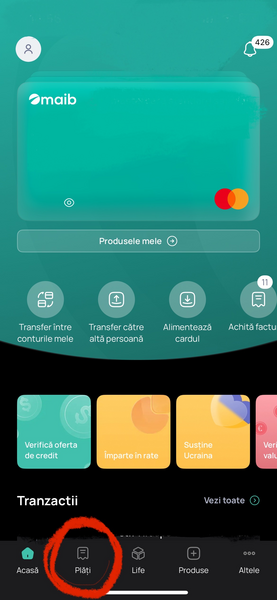
Make the transfer directly from the MAIB app in just a few simple steps.
Payment steps:
- 1
Open the MAIB app and go to the „Payments” section.
- 2
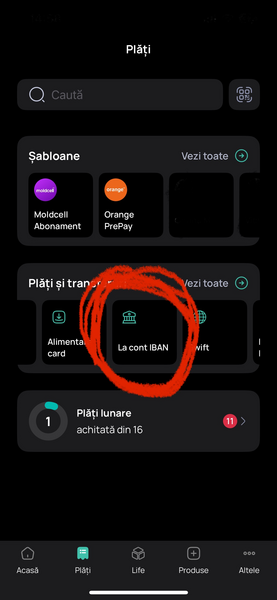
Select the „To IBAN account” option.
- 3
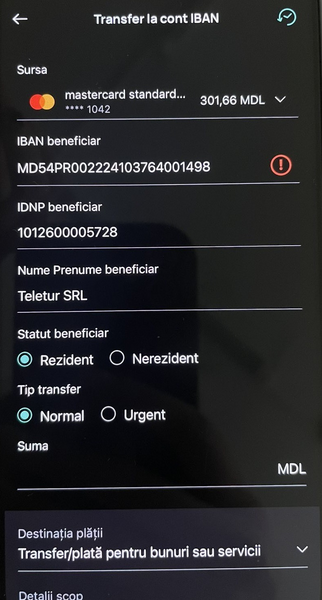
Enter the IBAN: MD54PR002224103764001498.
- 4
Enter the beneficiary name: Teletur SRL.
- 5
Add the tax code: 1012600005728.
- 6
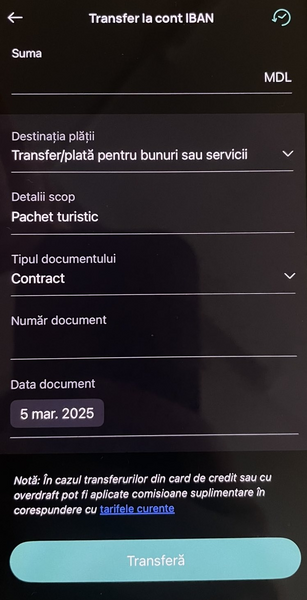
Select the document type: Contract.
- 7
Enter the purpose: Tourist package.
- 8
Enter the document date: March 5, 2025.
Useful information:
- Make sure all entered details are correct.
- The payment is processed instantly or within a few minutes.
- Credit card payments may be subject to additional fees.
- You can save the payment as a template for future use.
- The transfer is secure, encrypted, and protected by MAIB.
- If you have any questions, contact the bank or Teletur.
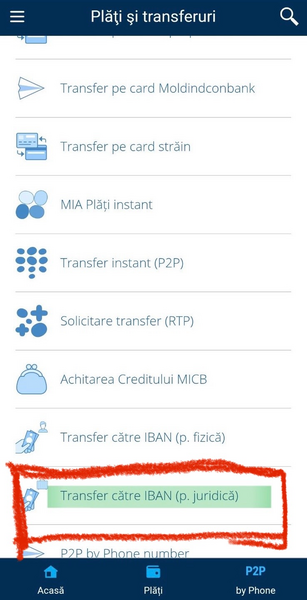
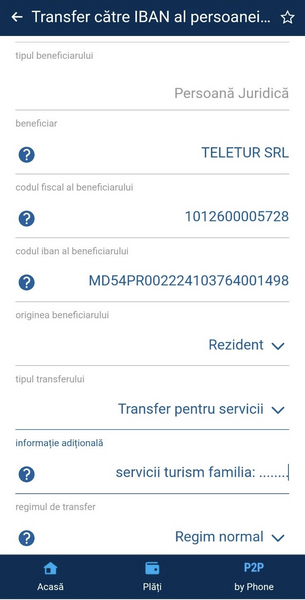
Make a transfer to Teletur using the Moldindconbank app.
Payment steps:
- 1
Open the Moldindconbank app and the „IBAN Transfer (legal entity)” section.
- 2
Select the client type: Legal Entity.
- 3
Enter the beneficiary: TELETUR SRL.
- 4
Enter the beneficiary's tax code: 1012600005728.
- 5
Enter the beneficiary's IBAN: MD54PR002224103764001498.
- 6
Select the beneficiary's status: Resident.
- 7
Select the transfer type: Payment for services.
- 8
In additional information, enter: Tourism services family: [Name].
- 9
Select the transfer mode: Normal.
Useful information:
- Check that all entered details are correct before confirming.
- You can save the transfer as a template for future use.
- For questions, contact MICB support or Teletur.
- The transfer is secure and processed quickly during banking hours.
Your payment is secure.
Always check the beneficiary details before confirming the transfer. If you have any questions regarding the payment, the Teletur team is here to help.